Pixelart Platformer Game Experiment
Pixel art platformer experiment built on a custom architecture focused on system management, dependency control, and modular gameplay flow.
- Pixel Art
- Platformer
- Custom Architecture
- System Design
- Gameplay Framework
- Dependency Management
The architecture provides a root entry point for creating and manipulating systems, holding and creating a map of all the systems, providing API to control the systems and manage dependencies, distributing all the necessary models, and enabling full control of the code flow and each part individually.
The image below shows the principal elements and the relationship among them.
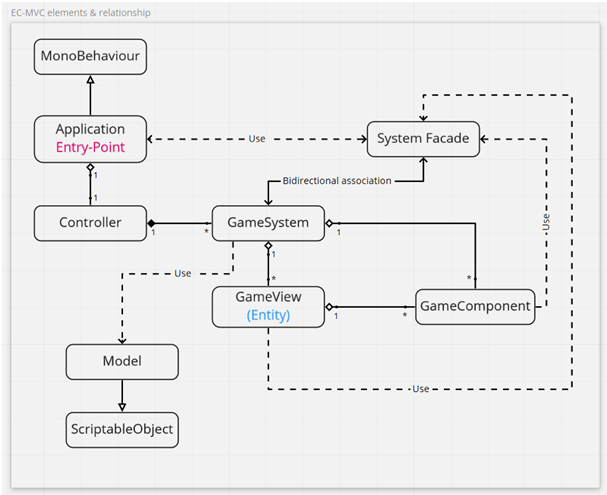
- Application: This is the root and single entry point for creating and manipulating systems in the architecture. It provides a central location for managing the different parts of the game.
- Controller: responsible for holding and creating a map of all the systems in the game. It provides an interface for accessing and managing these systems.
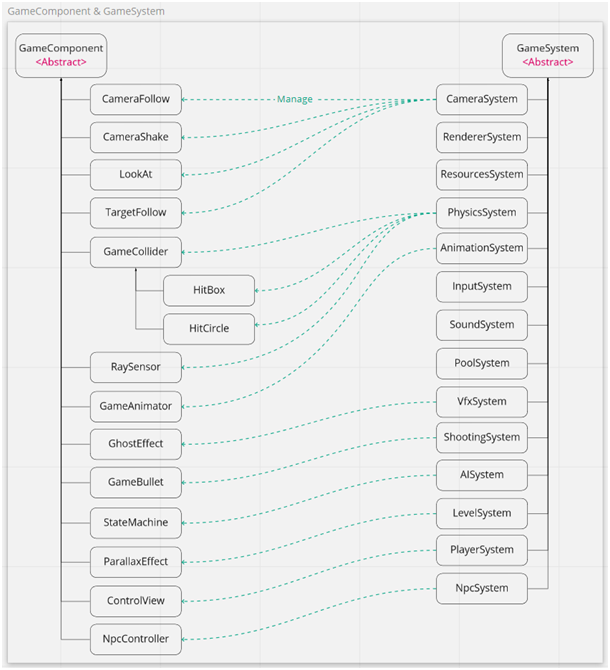
- GameSystem: An abstract class that manages all the related GameComponent and GameView instances in the game. It is responsible for injecting dependencies through constructors, managing the game models, and distributing the necessary data to other parts of the game.
- Model: These are ScriptableObject sub-classes that hold data and configurations for all the different parts of the game. They provide a flexible and reusable way of storing game data.
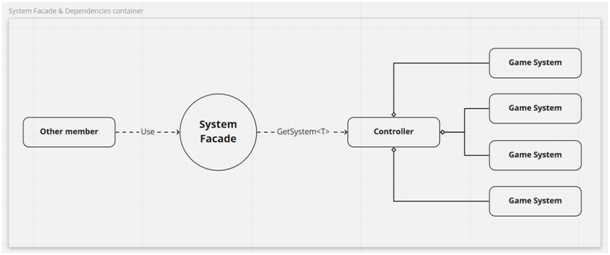
- SystemFacade: acts as a dependencies container, providing an API for accessing and managing the different systems in the game. It also provides a central location for handling dependencies between different parts of the game.
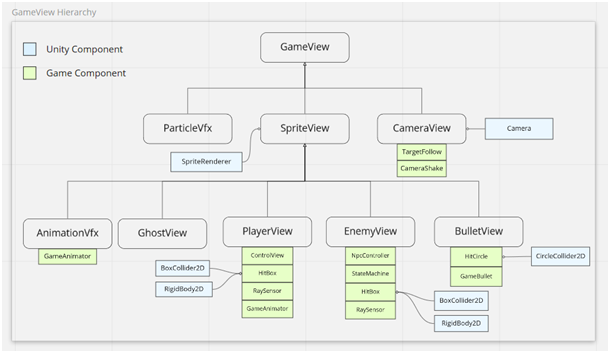
- GameView: is an entity that represents actors in the Unity space through a GameObject. It creates a map of the attached components and provides a way of accessing and manipulating them.
- GameComponent: These are reusable modules that are attached to GameView entities and contain all the different behaviors for that entity. They provide a way of adding functionality to the game without creating new entities or systems.
In this architecture, the "Facade Design Pattern" plays a crucial role by serving as an interface to provide an API for controlling systems and acting as the dependencies container. By encapsulating the complexity of the underlying system and exposing a simplified interface, the facade design pattern simplifies the client code's interaction with the system. Additionally, it provides a unified interface to access the subsystem's functionality, which can be utilized to create high-level functionality that builds on the subsystems.
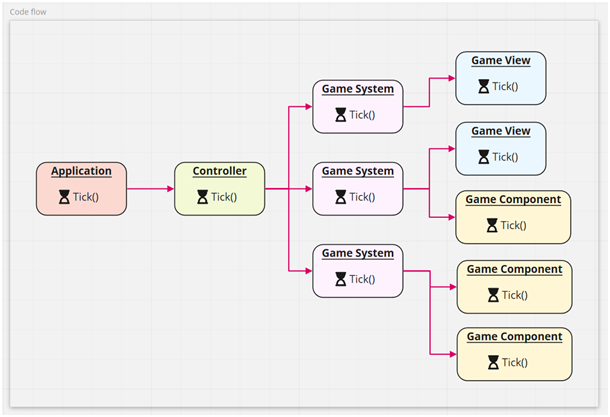
We can have complete control over the code flow of the game and each individual part. For example, the "Tick" function, which is responsible for updating the state of the game, can be called at the appropriate time to ensure smooth gameplay. This level of control allows for greater flexibility and precision in game development, resulting in a more polished and optimized final product.
Accessing systems and components is made simple and convenient through the use of generic methods.
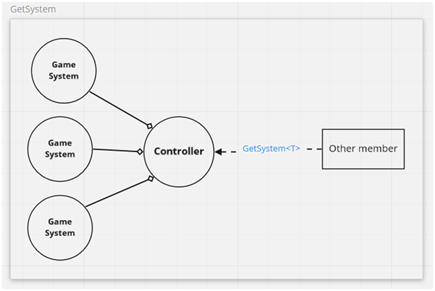
public T GetSystem<T> where T : GameSystem
{
     if (!_systems.ContainsKey(typeof(T))) return null;
     return (T) _systems[typeof(T)];
}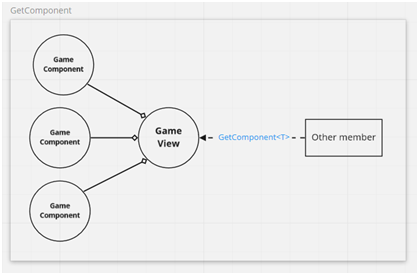
public T GetComponent<T> where T : GameComponent
{
     if(!HasComponent<T>()) return null;
     var component = Components[typeof(T)] as T;
     return component;
}
This diagram provides an overview of the GameView hierarchy and its related components. It shows how the GameView entity represents actors in the Unity space through a GameObject and creates a map for the attached components.
This diagram provides an overview of the relationship between game components and systems. It shows which systems are responsible for managing each game component, providing a clear picture of the dependencies between the various parts of the architecture.
A few behavior examples
1 / 3
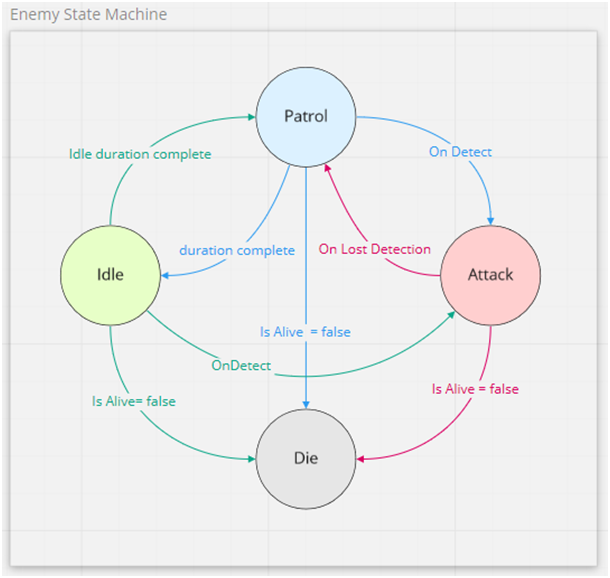
The enemy AI state machine with basic states.